8.14.18. STRUDEL-18 — SFX Lab: a procedural sound-effect workbench
The SFX Lab is an interactive workbench for authoring one-shot sound
effects — kicks, snares, hats, zaps, impacts — entirely procedurally, with
no recorded samples. A sound is a stack of layers, each an sfxr
(subtractive, the classic 8-bit “jsfxr” voice) or modal (struck /
resonant) generator with its own gain and onset delay. You build the stack
from docked panels, audition each layer or the whole mix, watch the rendered
waveform + spectrum update live, optionally load an external .wav to
mimic, and — the payoff — export the finished sound as a drop-in
daslang render function that needs no editor to run.
It is built on the daStrudel audio engine (the strudel_sfxr /
strudel_modal / strudel_sfx modules under modules/dasAudio/) and
a dasImgui / ImPlot GUI. The tool lives at
examples/daStrudel/sfx_lab/.
8.14.18.1. Running it
The GUI depends on the dasImguiImplot daspkg package, declared in
the tool’s .das_package (dasImgui itself ships in-tree with daslang —
nothing to install for it). Install it once (this clones and builds the
C++ shared modules into modules/), then run the tool with no
-load_module flags:
cd examples/daStrudel/sfx_lab
daslang ../../utils/daspkg/main.das -- install
daslang -project_root . main.das
The same main.das runs windowed (above), headless
(-- --headless --headless-frames N for CI / scripted renders), and live
(daslang-live -project_root . main.das for imgui_snapshot /
playwright inspection) — audio is wired in init() so every mode has
sound.
8.14.18.2. The workbench
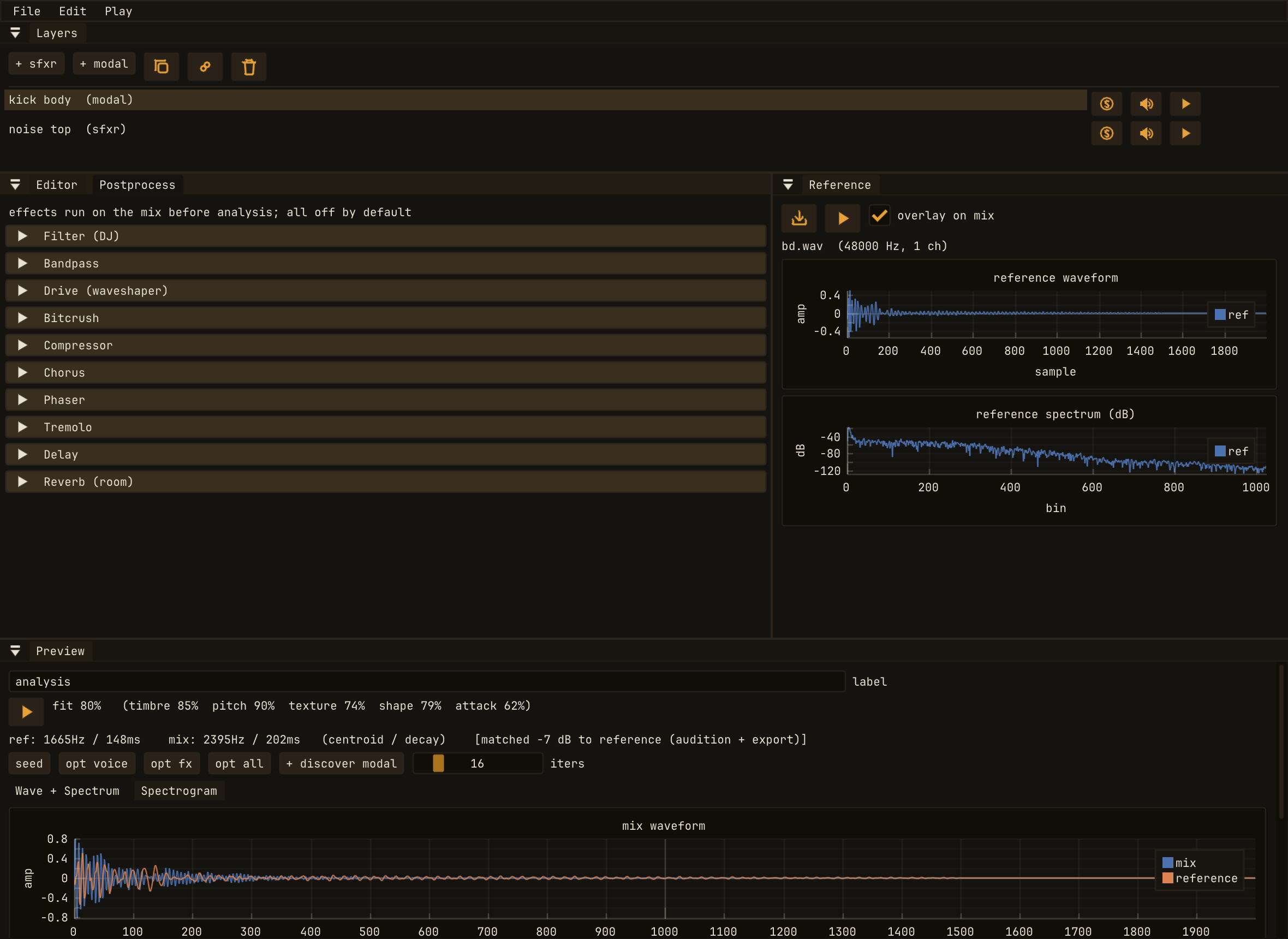
The docked workbench: Layers (the stack), Editor (the selected
layer’s voice parameters), Preview (the summed mix as waveform +
spectrum), plus Reference and Postprocess. Panels re-dock
freely; the layout persists in imgui.ini.
Five panels, all re-dockable:
Layers — the layer stack. Add an sfxr or modal layer, select one, solo / mute it, duplicate it (optionally dup-linked so edits to the source mirror into the copy), reorder, delete, and play an individual layer.
Editor — the selected layer’s voice parameters (every sfxr / modal field), plus its gain, onset delay, and link toggle. A free-form label sits at the top of the editor — handy when you run two copies of the tool side by side and need to tell them apart.
Preview — the summed mix. The Wave + Spectrum tab shows the rendered waveform and its magnitude spectrum (ImPlot); the Spectrogram tab shows the time–frequency view.
Reference — load an external
.wavto mimic. Its waveform and spectrum overlay the mix so you can match a real sound by eye, and Play → match reference loudness levels your audition to the reference’s loudness so you compare timbre, not volume.Postprocess — a ten-effect master chain (filter, band-pass, drive, bit-crush, compressor, chorus, phaser, tremolo, delay, reverb) applied to the mix.
8.14.18.4. The .sfx format
File → Save sound writes a .sfx file — JSON describing the layer
stack, the per-layer voice parameters, the post chain, a master gain, an
optional mimic_target reference path, and a free-form label. A game
loads it at runtime with render_sound_file("foo.sfx"). The example kit
drums live in examples/daStrudel/sfx_lab/sounds/*.sfx — open them to see
how each was built.
8.14.18.5. Exporting a drop-in .das render function
File → Export .das render function turns the current sound into real,
readable daslang — a self-contained function with the standard one-shot
drum signature that you can paste straight into your own code (or into
strudel_synth) and call with no editor and no .sfx file:
// Generated by the SFX Lab. Drop-in render function; requires:
//   require strudel/strudel_sfx   // re-exports strudel_modal + strudel_sfxr
def render_bd(duration, gain : float) : array<float> {
    var layers : array<Layer>
    var l0 = modal_layer("body", ModalVoice(pitch = 55.0, n_modes = 2, ring = 0.18))
    layers |> emplace(l0)
    var l1 = sfxr_layer("click", SfxrSound(env_decay = 0.06, base_freq = 0.5))
    l1.gain = 0.4
    layers |> emplace(l1)
    var out <- render_sound(layers)
    return <- sfx_conform(out, 44100, 48000, duration, gain * 1.0)
}
The filename you choose is the function name (export
render_bd.das → def render_bd(...)). The emitter writes only the
non-default fields, rebuilds the layers and post chain, calls the engine,
and conforms the result to the host’s 48 kHz rate with a tiny fade so the
one-shot never clicks on attack or release. Pass base_freq as a third
argument (the parametric form) to pitch a modal sound at call time — that is
exactly how the kit’s pitched tom is generated. The eleven
strudel_synth drum renderers (render_bd / render_sd /
render_hh / …) were re-authored in the SFX Lab and exported this way.
8.14.18.6. A/B comparison with drum_compare
examples/daStrudel/drum_compare/ lays out the eleven kit drums as pads
and plays each one either from the SFX Lab .sfx kit or from the
General-MIDI percussion of a SoundFont — press S to toggle the whole
grid between the two banks, so you can A/B the procedural drum against its
reference and tune by ear.
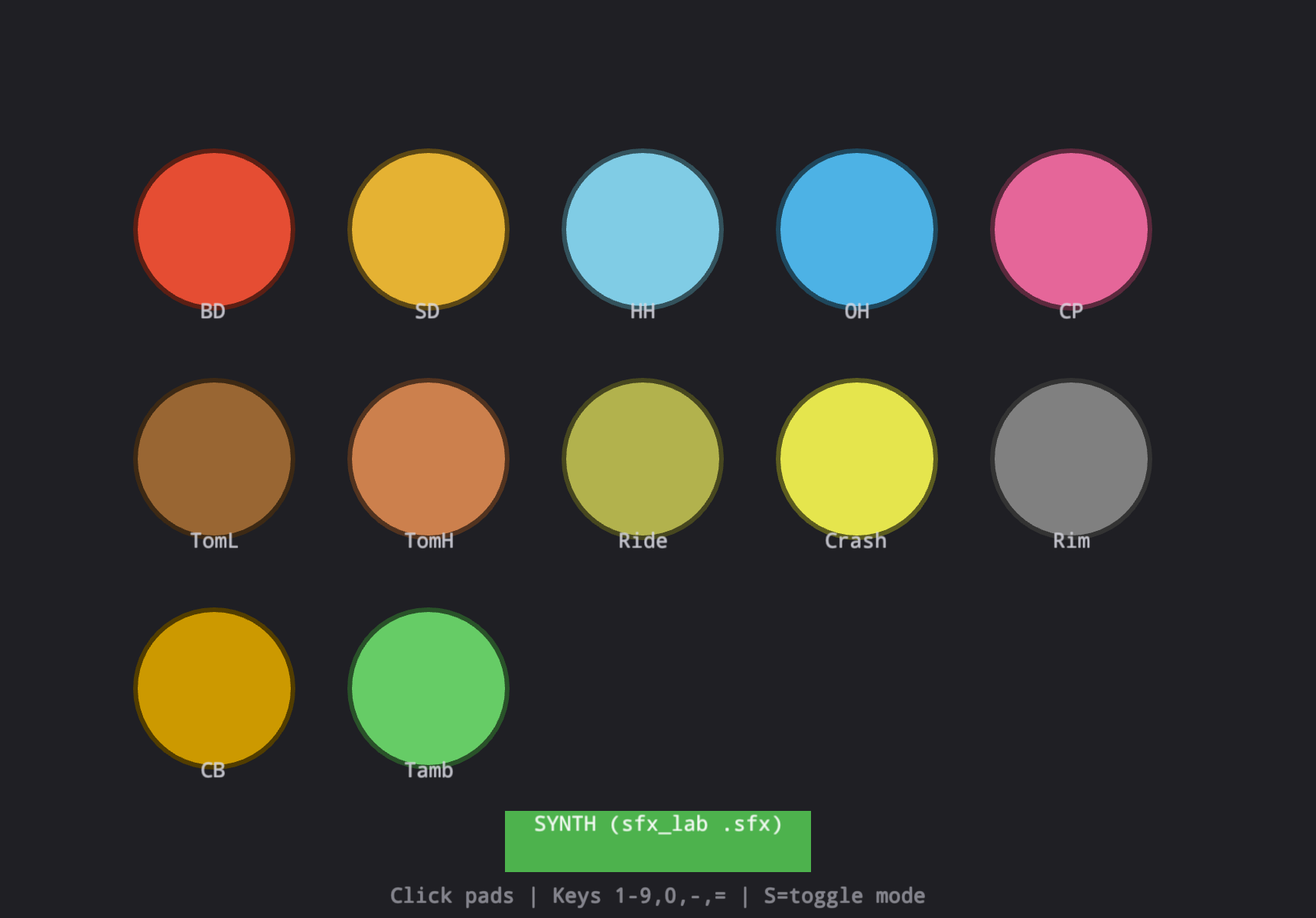
drum_compare — click a pad (or press its number key) to audition that
drum; the green chip shows the active bank, and S toggles between the
SFX Lab kit (SYNTH) and the SoundFont reference (SF2).
See also
Tool source: examples/daStrudel/sfx_lab/main.das
Reusable engine modules: strudel_sfxr (subtractive sfxr voice),
strudel_modal (struck / resonant modal voice), and strudel_sfx
(the multi-layer Sound model, render_sound, the post chain, the
.sfx format, and the .das exporter) — all under
modules/dasAudio/strudel/.
Previous tutorial: STRUDEL-17 — HRTF: 3D Positional Override for Pan
Full daStrudel reference: Strudel (Live Coding)